Writing
Hemingway Editor: Best AI Writing Tool for Writers?
Workflows Hemingway Editor appears in
Best for
- Bloggers self-editing for plain English
- Marketers tightening copy before publishing
- Students improving essay clarity
Not for
- No grammar checking — pair with Grammarly or ProWritingAid
- Style suggestions can feel formulaic if followed literally
- AI rewrites lag behind dedicated AI writers
Pricing
From: $10/mo
Free plan available See full pricing →Key features
- Grade-level readability scoring
- Passive voice highlighting
- Complex sentence detection
- Adverb and weakener flagging
- AI rewrite suggestions (paid plan)
- Distraction-free desktop app
Limitations
- No grammar checking — pair with Grammarly or ProWritingAid
- Style suggestions can feel formulaic if followed literally
- AI rewrites lag behind dedicated AI writers
- Desktop app feels dated despite recent updates
What it is
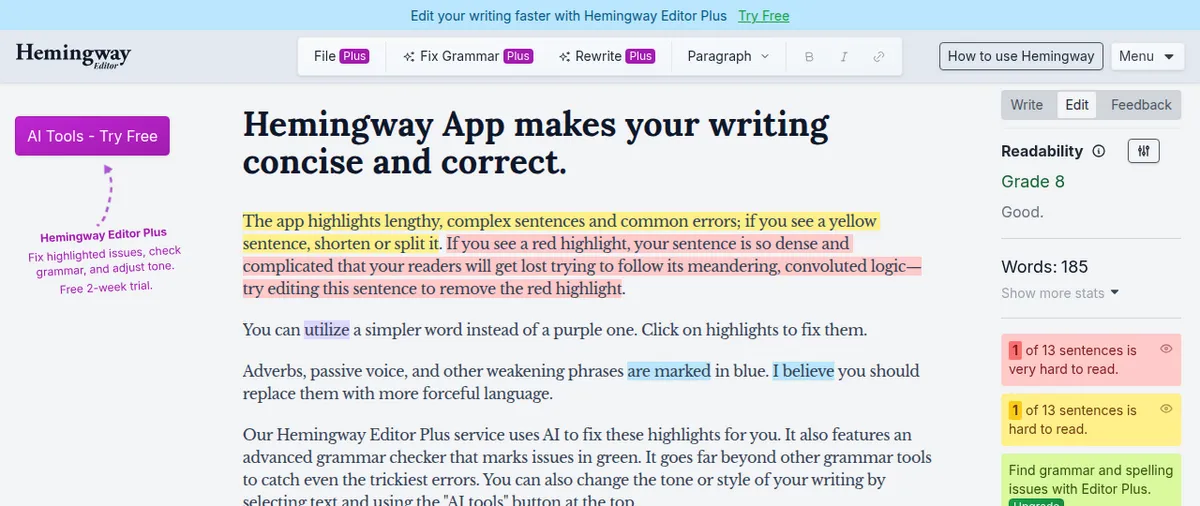
Hemingway Editor was built around one premise: most writing is too complicated. Paste your draft in, and it color-codes sentences by reading difficulty, highlights passive voice, flags adverbs, and gives you a grade-level score. The free web version is still genuinely useful 15 years after launch.
What it does well
The readability heuristics are battle-tested. Following them produces tighter, more direct prose. For bloggers, marketers, or anyone writing for general audiences, running drafts through Hemingway before publishing catches things you’d otherwise ship. The recent AI rewrite addition handles light edits decently.
Where it falls short
Hemingway doesn’t check grammar — only style. Treating its suggestions as rules rather than flags produces formulaic copy. The AI rewrites lag behind dedicated AI writers. The desktop app, while functional, feels stuck in 2015 design-wise.
Who it’s for
Anyone writing for general audiences — bloggers, marketers, content writers, students. Pair it with Grammarly for grammar coverage. Not a fit for academic writing, legal documents, or technical writing where complexity is sometimes necessary.
Stacks that include Hemingway Editor
Frequently Asked Questions
Is Hemingway Editor free?
The web version is free with full readability scoring. The $10/mo Plus plan adds AI rewrites and team features. The legacy desktop app is a one-time $19.99.
Does Hemingway check grammar?
No — Hemingway focuses on style and readability. For grammar use Grammarly, ProWritingAid, or LanguageTool.
Should I always follow Hemingway's suggestions?
No. Use them as flags to consider, not commands. Some "complex" sentences are necessary for technical content.
Does Hemingway integrate with WordPress or Google Docs?
Limited — there's a WordPress publishing flow from the desktop app but no Google Docs plugin. Most users copy-paste.
Is the AI rewrite feature good?
Adequate for sentence-level rewrites — not a replacement for Jasper or Claude. Useful for quick simplification rather than substantial reworking.
We earn commission on purchases through our links at no cost to you. Learn more.